The magnetic section of the Bilbao Crystallographic Server –
1 st -Tutorial
J. Manuel Perez-Mato and Luis Elcoro
Dept. Física de la Materia Condensada, Facultad de Ciencia y Tecnología, Universidad del Pais Vasco (UPV/EHU), Apdo. 644, 48080 Bilbao This first tutorial includes practical introductory examples for the following programs:
MGENPOS : Section2 IDENTIFY MAGNETIC GROUP : Section 3 MWYCKPOS: Section 4 MPOINT: Section 5 MTENSOR: Section 6
For other programs of the magnetic section see the 2 nd rd and 3 tutorials
1. Introduction
Below you can see a screenshot showing the databases, tools and programs that are available online at the Bilbao Crystallographic Server
2. MGENPOS: General Positions of Magnetic Space Groups
This tool is a database of the 1651 different possible magnetic space groups (MSGs), also called Shubnikov groups. It lists for any chosen MSG the set of symmetry operations defining the group. These symmetry operations are also called the “general positions of the group”, as they represent for a general position with arbitrary magnetic moment: (x,y,z; mx,my,mz), all the positions (and magnetic moments) that are symmetry related (apart from those related by the lattice translations). The list of general positions or symmetry operations of the MSGs are given in the setting, which was first provided in computer readable form by the ISOTROPY webpage [3], and we take as the “standard setting” of the MSGs.
The symmetry operations describing the symmetry group of any commensurate magnetic structure can always be put, by choosing an appropriate unit cell and origin, in the standard form of one MSG (and only one!) of the 1651 MSGs, as listed here (see below the tool IDENTIFY MAGNETIC GROUP).
MGENPOS can list the operations of any MSG in either the BNS or the OG setting (this latter coinciding with the one used in Litvin’s ebook [4]) , but for the moment in this tutorial we will restrict ourselves to the BNS setting. We leave some additional considerations about the OG setting for a more advanced tutorial.
Any desired MSG can be introduced in MGENPOS by means of its BNS numerical label, but the desired MSG can also be decided by first choosing its mathematically underlying space group:
2a) Click on the button “choose it”. We then get a list of the 230 ordinary space groups. Click on one of them, say Pcca (N. 54). You will then obtain a listing of all possible MSGs derived in the BNS approach from the space group Pcca (N. 54), in the following form (disregard the second listing corresponding
2b) Click on one MSG of type IV, say 54.352 P I cca, and click next on “standard/default setting”. The list of the symmetry operations of the MSG
The list includes 16 symmetry operations divided into 8 which do not include time reversal and 8 that are generated by multiplying these initial 8 operations
In our case the ordinary space group F is the number 54, Pcca. All type IV MSGs in the initial list have therefore the same set of “black” symmetry operations in the list given by MGENPOS, as all of them have Pcca as the group F in the above decomposition. You can check this fact by looking at the list given by the program for any other MSG of type IV, and see that the set of black operations, i.e. operations without time reversal coincide with those obtained previously for 54.352.
2c) Come back to the list of possible MSGs derived from the space group 54, and click on a group of type III, say 54.343 Pcc’a’ :
where F is a subgroup of Pcca, and {R|t} (without time reversal) is an operation of the ordinary space group Pcca, not belonging to F.
We can check that F in this example is a group of type P2 1 /c using a tool in the Bilbao Crystallographic Server for ordinary space groups, which is outside its magnetic section, namely the program IDENTIFY GROUP in the first section: “Space Group Symmetry”.
2d) Doing copy/paste, just take the “black” operations in the list deleting the “+1”, to convert them in operations of an ordinary space group:
x, y, z x+1/2, -y, -z+1/2 -x, -y, -z -x+1/2, y, z+1/2
Paste this set of four operations in the input window of “IDENTIFY GROUP”, and submit. The program will then identify the group as P2 1 /c, but with the monoclinic axis along a, as it is shown in the transformation it proposes to pass to the standard setting of this space group. If we follow the same procedure, but including the 8 operations, disregarding the “-1” of the other 4 operations, what space group will be identified by the program, and which transformation to standard?
The MSG of a magnetic phase defines the symmetry constraints of all degrees of freedom of the structure, including the non-magnetic ones, as the atomic positions. But for non magnetic degrees of freedom the presence of time reversal or not in a symmetry operation is irrelevant, and the symmetry constraints can therefore be described by an ordinary space group, formed by all operations of the MSG disregarding the presence or not in them of time reversal. We shall call this ordinary space group, the effective space group of the MSG. In the case of the MSG Pcc’a’, it is clear that this space group is Pcca, both groups having the same lattice. But what is the effective space group for the type IV MSG 54.352 P I cca, which we have considered at the beginning? We shall obtain this effective space group using again “IDENTIFY GROUP”
2e) Come back to the listing of the MSG 54.352 P I cca and copy/paste in the input window of “IDENTIFY GROUP” all the listed symmetry operations, disregarding the “-1” or “+1”: x, y, z x+1/2, -y, -z+1/2 -x, y, -z+1/2 -x+1/2, -y, z -x, -y, -z -x+1/2, y, z+1/2 x, -y, z+1/2 x+1/2, y, -z x+1/2, y+1/2, z+1/2 x, -y+1/2, -z -x+1/2, y+1/2, -z -x, -y+1/2, z+1/2 -x+1/2, -y+1/2, -z+1/2 -x, y+1/2, z x+1/2, -y+1/2, z x, y+1/2, -z+1/2
and submit. In fact, the program only needs as input a minimal set of generators, and therefore this list can be strongly shortened, if you make a appropriate choice of generators (only 4 generators are really needed). The program then identifies the effective space group:
3. IDENTIFY MAGNETIC GROUP: Identification of a MSG from a set of
generators in an arbitrary setting
Magnetic structures are usually described with the same origin and axes orientation as those used for its parent paramagnetic phase, which is taken as reference. In many cases, this means that the symmetry of the magnetic structure must be described by a MSG in a non-standard setting. In general, the transformation to a description with the MSG in its standard form requires a change of origin and a different choice of unit cell.
We shall see here a simple example of this quite general situation, using IDENTIFY MAGNETIC GROUP to identify the actual MSG describing the symmetry of a specific magnetic structure.
3a) Open MAGNDATA and search structures containing Sr and Ir using the corresponding element search option in the menu. From the list of structures appearing choose the entry #1.77 corresponding to Sr 2 IrO 4 .
This structure has a paramagnetic phase with space group I4 1 /acd (N. 142), and its magnetic phase has a propagation vector k = (1,1,1). This means that the magnetic ordering breaks the bcc lattice centering of the paramagnetic structure but keeps the periodicity given by the tetragonal unit cell. The
in a non-standard form, i.e. the operations do not coincide with those listed for this MSG in MGENPOS.
Note that the basis transformation to standard in the ouput of the program is given as a matrix with the transformed cell vectors as columns, such that the
4. MWYCKPOS: Wyckoff positions of magnetic space groups
4a) Introduce the numerical label 54.352 correponding to the space group
point with point group symmetry -1’, and this forbids the presence of a non-zero magnetic moment.
5. MPOINT: Magnetic Point Group Tables
Macroscopic crystal tensor properties of magnetic structures only depend on the magnetic point group of the system. This is just formed by the set of rotational and roto-inversion operations, with time reversal added or not, which are present in its MSG.
6. MTENSOR: Symmetry adapted form of crystal tensors in magnetic
phases
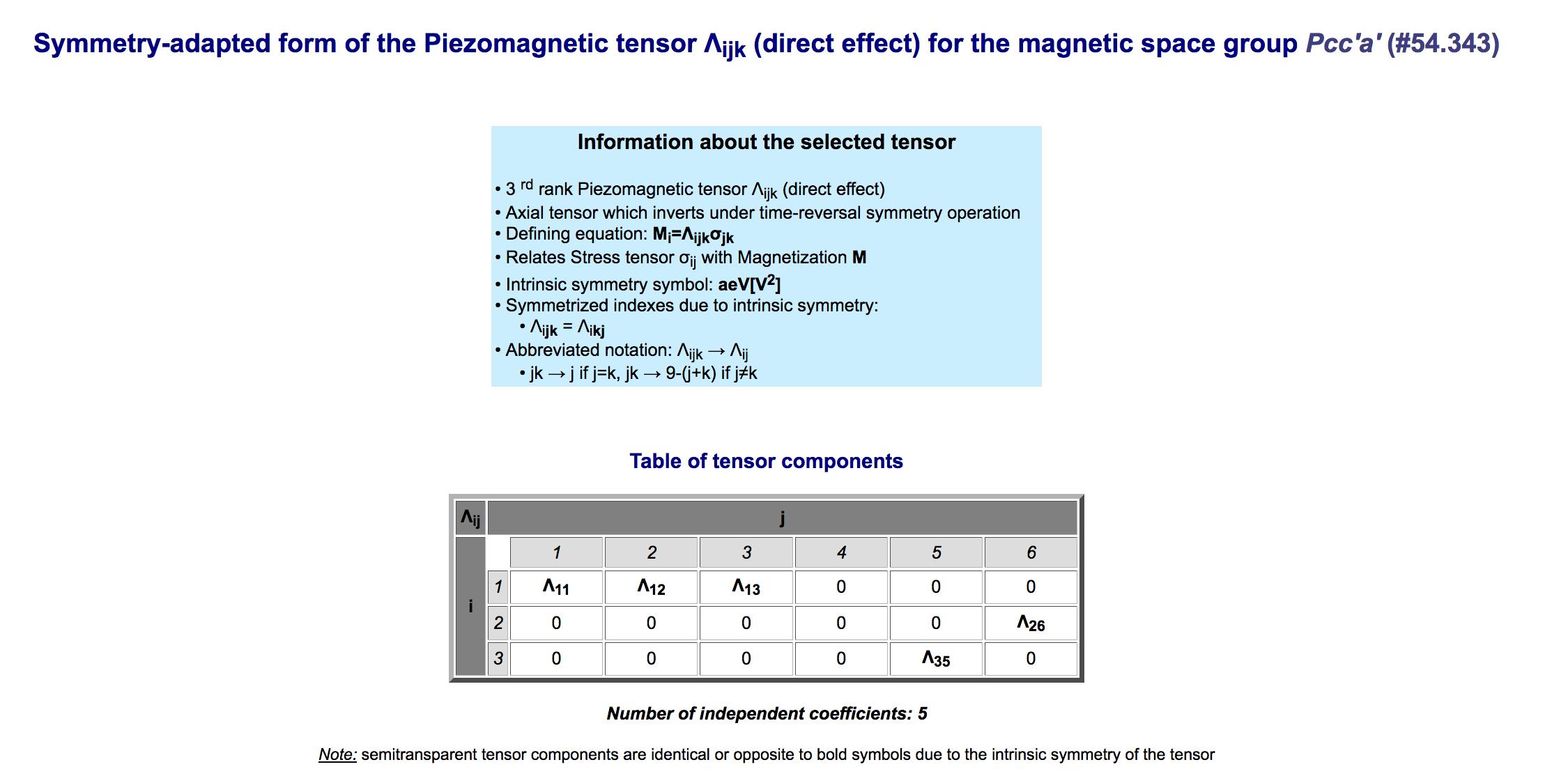
MTENSOR is a program that provides the symmetry adapted form of any type of crystal tensor. The desired property can be chosen among a list which specifies more than 100 distinct crystal tensors divided in four classes: equilibrium tensors, optical tensors, non-linear optical susceptibility tensors and transport tensors. In addition, using abstract generalized (so-called Jahn) symbols, which define the transformation properties of the tensor one can also get the symmetry-adapted form of any kind of tensor property for any magnetic point group, as long as its rank is not greater than 8.
6a) Open MTENSOR and choose the space group Pcc’a’. Although the symmetry constraints on a tensor only depend of the system magnetic point group, the program allows to introduce its full MSG, because then it considers the point group with the orientation associated with the standard setting of the space group, which in general may not be the standard setting for the point group, as we have seen in the previous version.
6b) Choose among the equilibrium tensors: “Magnetization vector Mi”, and
REFERENCES [1] J.M. Perez-Mato, S.V. Gallego, E.S. Tasci, L. Elcoro, G. de la Flor, and M.I. Aroyo, “Symmetry-based computational tools for Magnetic Crystallography” Annu. Rev. Mater. Res. (2015), 45:13.1-13.32 [2] S. V. Gallego, J. Etxebarria, L. Elcoro, E.S. Tasci and J.M. Perez-Mato, “Automatic calculation of symmetry-adapted tensors in magnetic and nonmagnetic materials: A new tool of the Bilbao Crystallographic Server”, Acta Cryst. A (2019) 75, 438-447. [3] H.T. Stokes and B. J. Campbell, ISO-MAG: Table of Magnetic Space Groups http://stokes.byu.edu/iso/magneticspacegroups.php [4] D. B. Litvin, Magnetic Group Tables, https://www.iucr.org/publications/iucr/magnetic-group-tables